What are Additional Service Jobs?
The Additional Service Jobs feature within Navarik Inspection serves as an an addition to a Marine type inspection nomination. Below are examples of services that an additional service job vendor could provide:
Agent: A local service provider that coordinates the practical and administrative needs of a vessel or cargo movement at a port. This can include arranging port services, documentation, customs/immigration coordination, transportation, supplies, and communication between the vessel, terminal, charterer, and other parties.
Ship-to-Ship (STS) Operator: A specialist company that manages the safe transfer of oil, LNG, or other petroleum products directly between two vessels, typically while offshore or at an anchorage. They coordinate the vessels, equipment such as hoses and fenders, mooring arrangements, personnel, and operational safety for the transfer.
Additives Provider: A company that supplies and, in some cases, injects or blends chemicals into crude oil or refined products to achieve a desired product characteristic or specification. Examples include additives used to improve fuel performance, stability, flow characteristics, conductivity, or other quality properties.
In high level terms, Agents coordinate the logistics, STS operators manage vessel-to-vessel cargo transfers, and additives providers supply chemicals used to adjust or improve the product.
Who Uses This Feature in the Navarik Inspection User Interface?
This feature is used by multiple parties and each party is responsible for parts of the workflow.
Cargo owners use the additional service jobs feature for submitting a quote request, accepting or rejecting a quote, expecting a completed performance by the vendor, and then marking the submitted invoice as paid or disputing the invoice.
Service vendors use the additional service jobs feature to submit a quote, and if accepted, perform the request and submit an invoice against it.
What User Roles are Associated With This Feature and What are their responsibilities?
Cargo owner side:
Additional Service Viewer - Read-only permissions to all additional services across the organization
Additional Service Scheduler - Follow similar patterns to the existing Operator role, allowing assignment to specific Desks for focused responsibility
- Coordinate additional services
- Read and update all other additional services scheduled across the organization
Additional Service Financial Operator - Follow similar patterns to the existing Financial Operator/Invoice Approver role, allowing assignment to specific Business Groups for focused responsibility
- Mark received additional services invoices as paid
Vendor side:
NOTE: Vendors authenticate into Navarik Inspection and operate within the RBAC framework
Additional Service Vendor User - Respond to any requests for quotations and the associated scheduled additional services
- Submit and adjust quotations
- Issue invoices
Additional Service Vendor System Admin - Responsible for user and organization management
- Full create, read, and update privileges to distribution list
High Level Workflow:
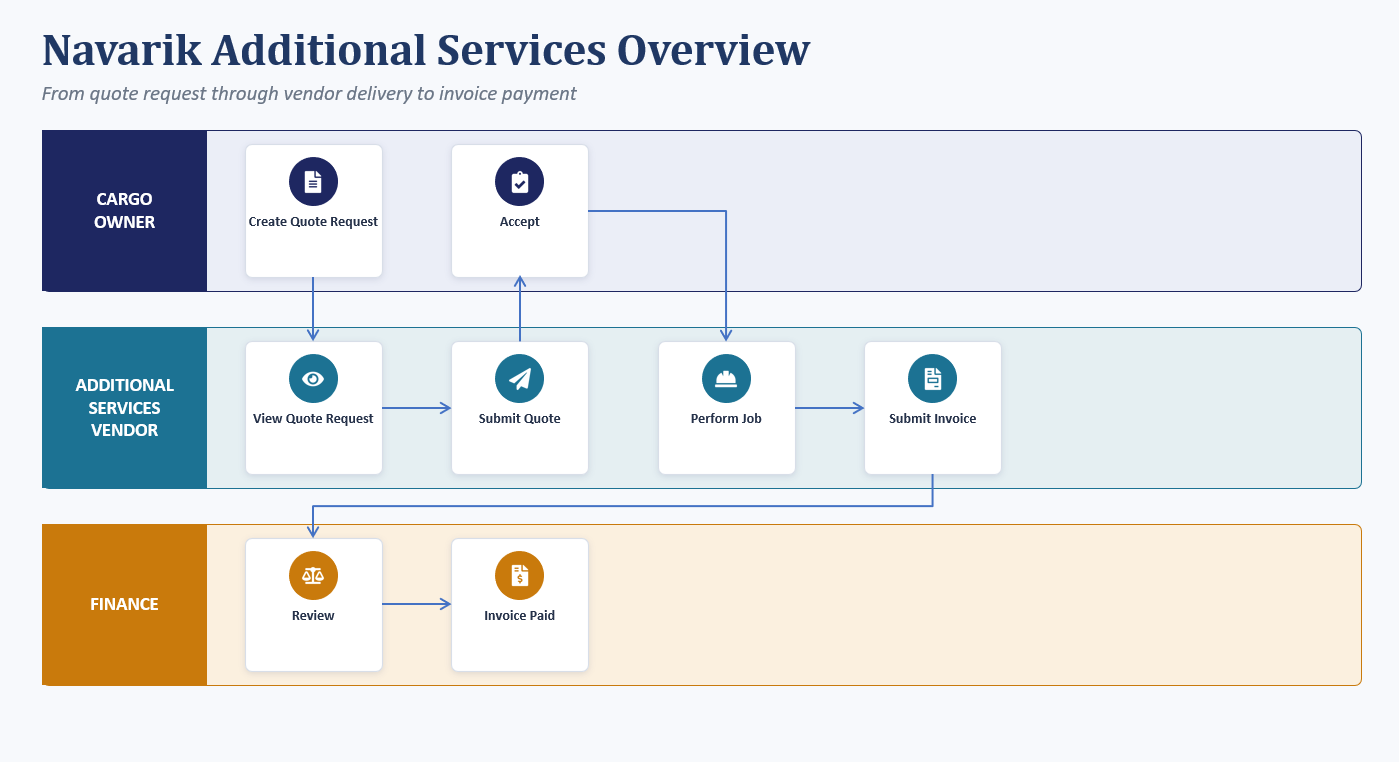
In this workflow process it is important to note the difference between a quote request and a quote. A quote request is an action performed by the cargo owner when inquiring for the price of an additional services job from one or more vendors. A quote is an action performed by the vendor when responding to the quote request of a cargo owner.
1. The cargo owner creates a quote request for an additional service job. The cargo owner can create multiple quote requests so that they can compare the prices. Service providers are not able to see other vendors' quotes. Once a quote is requested it can be modified.
2. The service vendor is able to provide a quote for the quote request. Once the quote is submitted, it cannot be deleted or modified without the intervention of the cargo owner.
3. On the nomination form, under the Additional Services section, the quote should now be present for any vendors that have provided a quote. The service vendor is not able to see this section, it is only available to the cargo owner.
4. The cargo owner accepts or rejects the quote(s) (one quote request per service type per vendor. Quotes from different vendors for the same service type for comparison is available.)
NOTE: When there are multiple quotes and one quote is accepted, the other quotes are automatically rejected (both accepted and rejected parties are notified via email)
5. The service vendor can submit an invoice for the accepted quote
6. The cargo owner can review and mark the invoice as paid, or dispute the invoice
If the invoice is disputed by the cargo owner, the service vendor will be able to modify their invoice and resubmit it
If the invoice is marked as reviewed by the cargo owner, the cargo owner can continue by marking the invoice as paid
Happy Path Workflow Diagram:
Additional Links:
See: Set up Additional Service Job Quote Request
See: Create an Additional Services Quote
See: Reject a Quote from a Service Vendor
See: Create an Additional Services Job Invoice
See: Dispute an Additional Service Job Invoice
See: Reviewing and Marking an Additional Services Job Invoice as Paid
See: Additional Service Jobs Viewall and Search
Additional Notes:
1. The invoice keeps an audit log of all events just like a regular inspection invoice would
2. The additional service job quote keeps a log of conversations
3. There can only be one quote per service type per vendor (to eliminate unintentional duplication)