Test Methods are the way that Quality Tests are measured. In Navarik Inspection they are created, modified, and deactivated through the catalogue drop-down menu. Please note you may need system administrator permissions from the cargo owner side in order to perform any actions beyond read-only.
Create a Test Method:
1. Navigate to the Catalogue drop-down menu
2. Select "Test Methods"
3. Select Create

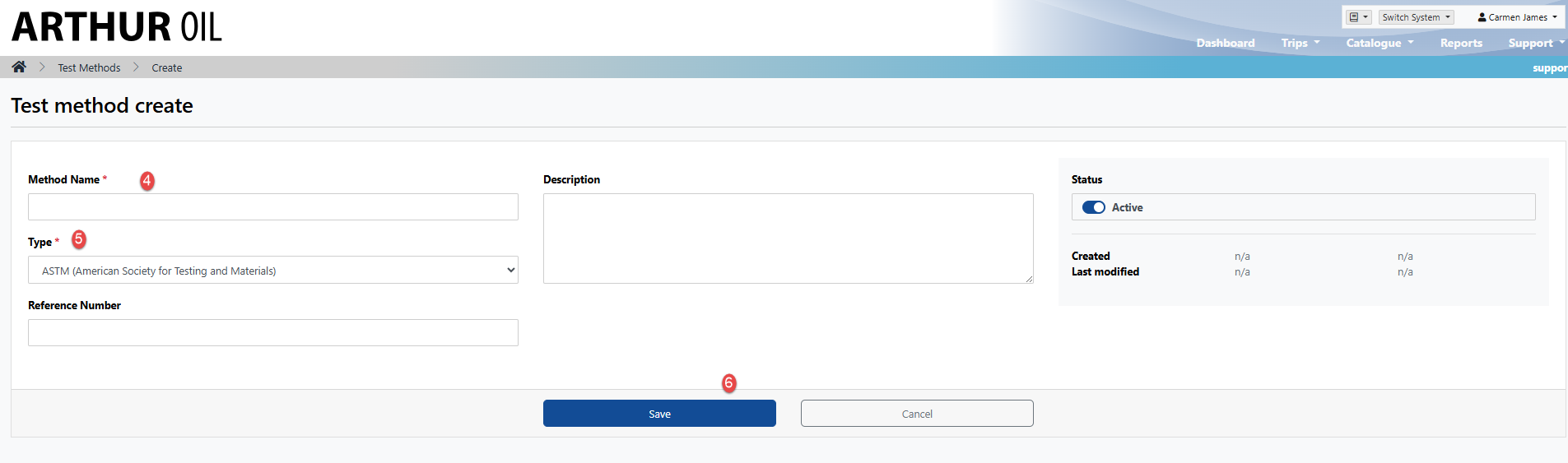
4. Enter a unique name (the system will not allow you to save if the name has been used previously. If you need to use this name, consider modifying or deactivating the existing record and then create a new one) see: Modify or Delete/Deactivate Test Method
5. Select a test method standard type from the Type drop-down (This list is managed by Navarik. If you need a test method type that is not listed here, please contact support@navarik.com)
6. Save
NOTE: Selecting the correct Test Method Type is important as this information will be displayed in the following areas (including customer facing): Nomination modify view, Nomination PDF, Nomination view, Inspection Worksheet modify view, Inspection Worksheet PDF, Inspection Worksheet view, Comm Log, Nomination email,
Example:
Nomination view:
