Automatic Parcel Matching is a time‑saving feature in Navarik that reduces manual effort for users. When a discharge or ship‑to‑ship marine inspection worksheet is submitted, Navarik Inspection automatically searches the voyage for all eligible parcels and matches them accordingly.
Navarik Inspection uses the following rules to automatically match parcels:
| ▪ | The parcels belong to the same voyage. |
| ▪ | The parcels are marine parcels. |
| ▪ | The parcels have the same grade type. |
| ▪ | The predecessor and successor parcels share a common transport. |
| ▪ | The successor parcel has an activity date (i.e. BL or Outturn date) that is the same or after the predecessor parcel. |
| ▪ | The parcels' quantity inspection results have been submitted. |
Once a discharge parcel is submitted, the system looks for the matching load parcel according to the above rules. Navarik Inspection calculates the predecessor and successor depending on the rules above, with the parcels being ordered chronologically. If the Bill of Lading Date and Outturn Date are the same, Navarik Inspection orders the parcels by loads and then by discharges.
Please note that the user may override the auto-matches created by Navarik Inspection by going to the voyage in question and using the matching drag-and-drop canvas to edit or remove the parcel matches. Once matched manually, the voyage will be ineligible for automatic matching. When Parcels Are Not Automatically Matched:
• If the parcel order cannot be determined, it cannot be automatically matched. For example, if the Outturn Date is before the Bill of Lading date, meaning that discharge is before the load, these parcels will not be automatically matched.
Existing Matches Are Maintained:
• Any existing matches that were created or modified manually are maintained. Navarik Inspection will not break these matches when it is automatically matching parcels. Navarik Inspection may add to an existing auto-match. Since a parcel can only be in one match, the auto-match never adds a parcel to more than one match.
Note: For more details, please refer to the Online User Manual available in NI:
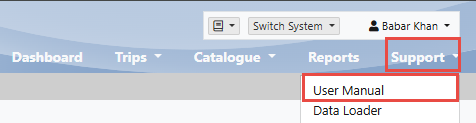
Note: For more details, please refer to the Online User Manual available in NI: