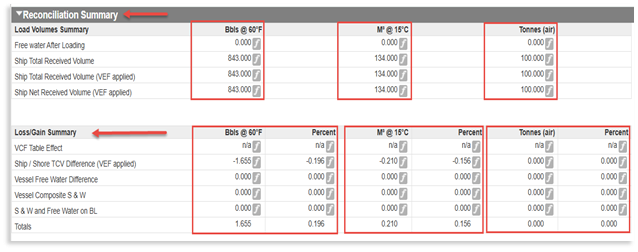
Navarik has enhanced the Reconciliation Summary on the inspection worksheet view. This was done to improve transparency and consistency across clients by aligning the display of loss/gain and delta calculations for all mandatory units of measure (UOMs) configured on a client profile, instead of only showing Bbls.
The changes are currently available in our UAT (testing) environment and will be available in production on May 2, 2026.
What Changed:
• The Reconciliation Summary now shows calculations for every mandatory UOM defined in the client’s quantity matrix, for example:
• All three locations show the same UOM columns and values. 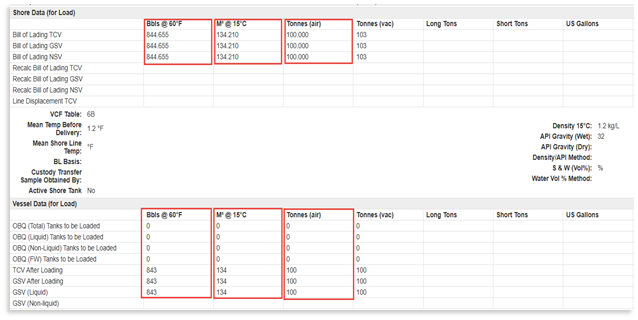
Accuracy and Data Coverage:
• Calculations for each UOM continue to use the existing loss/gain and delta logic; this work focuses on surfacing values that were already being calculated.
• New columns are visible for current and historical data:
• Previously calculated mandatory UOM values are now displayed where available.
Why this Matters:
• Users investigating 2-point loss/gain can:
○ See discrepancies across all relevant UOMs directly in the Reconciliation Summary
○ Reduce the need for manual conversions just to confirm triggers or red-flagged conditions
• This addresses confusion where an investigation might cite a trigger, but the Reconciliation Summary, shown only in Bbls appeared to have no red values.
Your feedback is valued! Please email support@navarik.com with any questions or comments